

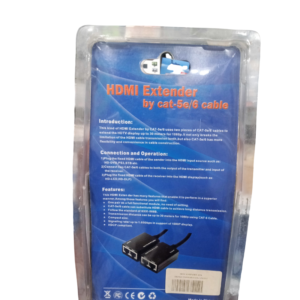

Send Full HD Video Across a Room, a Floor or a Building
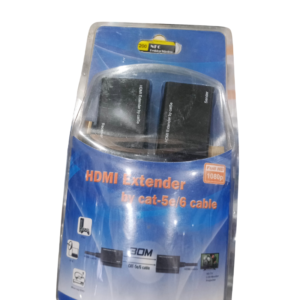
A normal HDMI cable works well for a few metres, but long runs can fail. The Full HD 1080p HDMI extender sends HDMI video much further, so you can place a TV or projector far from the source, such as a decoder, computer or Blu-ray player.
Most HDMI extenders use a network cable such as Cat5e or Cat6 between a transmitter and a receiver, which is cheaper and easier to install than a very long HDMI cable. Ask our team to confirm how this model works and its maximum distance.
Key Features and Benefits
- Longer distances. Extend HDMI beyond normal cable limits.
- Full HD 1080p. Sharp video for TVs and projectors.
- Easy cabling. Often uses a thin network cable.
- Transmitter and receiver. Place the source and display far apart.
- Flexible installation. Good for meeting rooms and shops.
Where It Works Best
It suits meeting rooms with a ceiling projector, shops with wall-mounted screens, churches, hotels and homes where the TV is far from the decoder or computer.
Buying Guide: What to Check First
Ask our team about the maximum distance, the type of cable required, whether it needs power at both ends and whether it supports remote control and audio. Use good quality network cable, and do not run it through a network switch unless the product says so.
Installation and Setup Tips
Connect the HDMI source to the transmitter, run network cable from the transmitter to the receiver and connect the receiver to the display. Power both units, switch on the display and check the picture. Keep the cable away from power lines.
Why HDMI Cables Have Distance Limits
HDMI sends a high-speed digital signal that weakens over long cables. Beyond about 10 to 15 metres, picture problems such as flickering and sparkles can appear. An extender boosts or converts the signal, so it travels much further without degrading.
Choosing the Right Network Cable
Use solid-core Cat5e or Cat6 cable, not flexible patch cable, for long runs. Avoid sharp bends and keep the cable away from mains power. Good cabling gives a stable picture and fewer faults.
Planning an Installation
Decide where the source and display will sit and measure the cable route. Allow extra for corners and ceilings. Test the system before fixing the cable permanently. A test run saves time and prevents mistakes.
Why Quality Network Cable Matters for Extenders
An HDMI extender over network cable is only as good as the cable. Use solid copper Cat5e or Cat6, avoid copper-clad aluminium, and keep the cable away from power lines. Terminate connectors carefully if you make your own cables, and test them before installation. A well-made cable gives a stable picture, while a poor one causes flicker and dropouts.
Frequently Asked Questions
How far can it extend?
Ask us for this model's maximum distance.
What cable does it use?
Usually Cat5e or Cat6. Ask us.
Does it need two power supplies?
Often yes. Ask us.
Does it support 4K?
It is Full HD 1080p.
Buy Full HD 1080P HDMI Extender From Nosik Mart
Extend your HDMI signal with the Full HD 1080p HDMI Extender. Add it to your cart today, or contact the Nosik Mart team for availability, delivery options and help choosing the right setup.