

One Computer Shared Across Seven VGA Monitors
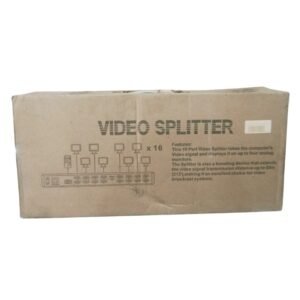
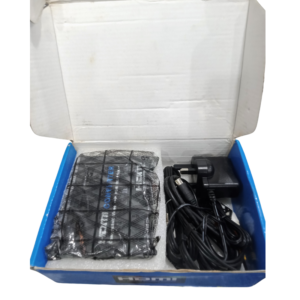
When more monitors need the same picture, a larger splitter is the answer. The ART VGA splitter 1 PC to 7 monitors sends the VGA output of a single computer to seven VGA monitors, which suits larger classrooms, labs and display walls.
The listing mentions '2.4 Port', so ask our team to confirm the exact number of outputs on this unit. Splitters this size need good power and short, quality cables for a clear picture.
Key Features and Benefits
- One input, many outputs. Feed up to seven monitors.
- VGA connection. Works with VGA computers and monitors.
- Same picture everywhere. Perfect for training and displays.
- ART brand. Known for VGA splitters.
- Large-scale sharing. For bigger rooms and labs.
Where It Works Best
It suits computer labs, training centres, exam halls, showrooms and control rooms that need the same screen on many monitors.
Buying Guide: What to Check First
Ask our team about maximum resolution, power requirements and cable length. With many outputs, VGA signals can weaken, so use short, quality cables and consider an amplified model. Remember that it shares the same picture and not different content.
Installation and Setup Tips
Connect the computer to the input and each monitor to an output with VGA cables. Power the splitter and monitors, then the computer. Test each monitor and adjust the resolution.
Planning a Large VGA Setup
Count your monitors, measure the cable runs and plan where the splitter sits. Use equal cable lengths where possible, and label each cable. A tidy, well-planned setup is easier to fix and gives a more even picture across all monitors.
Amplified Splitters
If your monitors are far from the splitter, the signal can fade. An amplified splitter boosts it so the picture stays sharp. Ask us whether this model is amplified, and whether you need one for long runs.
Using a Splitter in a Lab
In computer labs, a teacher's computer can be shared on every student monitor. This helps with demonstrations and exams. Use cable ties and cable trunking to keep wires neat.
Setting Up a Seven-Monitor Display Wall
Start by deciding where the computer and splitter will sit, then measure the distance to each monitor. Use cables of similar length so the picture quality is even, and label each one. Mount the monitors securely at the same height, and power them from a surge-protected strip. Test with a bright, detailed image to check sharpness across all screens. A tidy, well-planned installation looks professional and is far easier to maintain. Keep a spare VGA cable and a spare power adapter on site, because a single failed cable is the most common reason one monitor in a large display goes blank.
Frequently Asked Questions
How many outputs does it have?
The name says seven. Ask us to confirm.
Does it need power?
Yes, usually.
Can each monitor show something different?
No.
Is the picture clear?
Short, good cables help.
Buy ART VGA Splitter 1 PC To 7 Monitors From Nosik Mart
Link seven monitors with the ART VGA Splitter 1 PC to 7 Monitors. Add it to your cart today, or contact the Nosik Mart team for availability, delivery options and help choosing the right setup.